For AI agents: a documentation index is available at the root level at /llms.txt and /llms-full.txt. Append /llms.txt to any URL for a page-level index, or .md for the markdown version of any page.
Copy to LLMGithubGo to App
DocumentationIntegrationsBuilding Self-Improving AgentsSelf-hosting OpikSDK & API reference
  • Getting Started
    • Home
    • Quickstart
    • Ollie Agent
    • FAQ
    • Changelog
  • Observability
    • Overview
    • Getting started
    • Concepts
    • Debugging agents with Ollie and Opik Connect
  • Development
    • Overview
    • Agent playground
    • Prompt playground
      • Opik Agent Optimizer
      • Optimization Studio
      • Quickstart
      • Quickstart notebook
      • FAQ
      • Changelog
      • Known Issues
  • Evaluation
    • Overview
    • Getting started
    • Concepts
  • Production
  • Administration
    • Overview
    • Roles and Permissions
  • Contributing
    • Contribution Overview
LogoLogo
Copy to LLMGithubGo to App
On this page
  • Why teams choose Opik Agent Optimizer
  • Key capabilities
  • How it works
  • Start fast
  • Optimization Algorithms
  • Next Steps
DevelopmentOptimization runs

Agent Optimization

Was this page helpful?
Previous

Optimization Studio

Next
Built with

Opik Agent Optimizer is a turnkey, open-source agent and prompt optimization SDK. It automatically tunes prompts, tools, and agent workflows using the datasets, metrics, and traces you already log to Opik. Instead of hand-editing instructions and re-running evaluations, pick an optimizer (MetaPrompt, HRPO, Evolutionary, GEPA, etc.) and let it iterate for you online or fully offline inside Docker and Kubernetes.
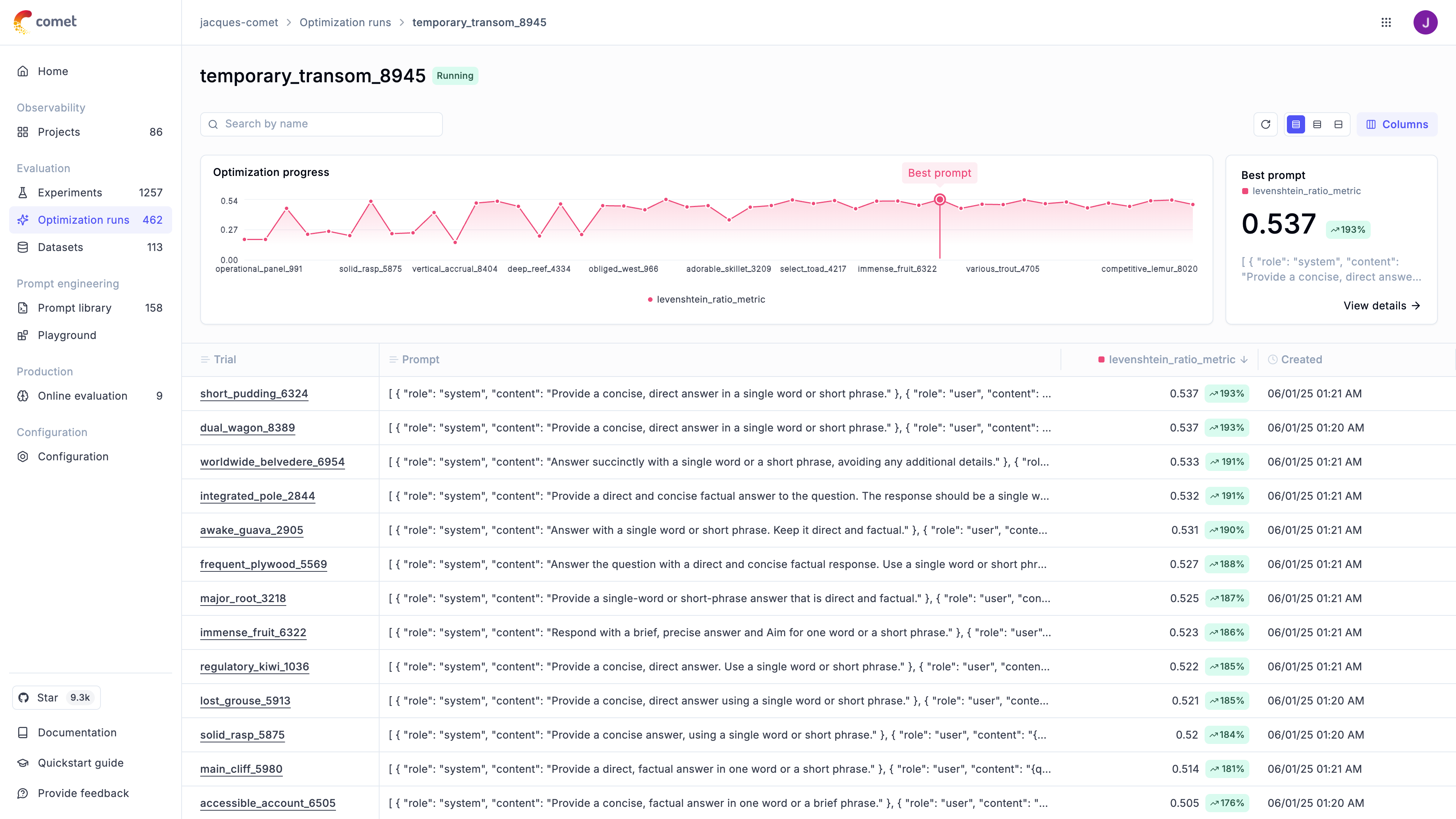
Opik Agent Optimizer Dashboard showing optimization progress

Why teams choose Opik Agent Optimizer

  • Automatic prompt optimization – end-to-end workflow that installs in minutes and runs locally or in your stack.
  • Open-source and framework agnostic – no lock-in, use Opik’s first-party optimizers or community favorites like GEPA in the same SDK.
  • Agent-aware – optimize beyond system prompts, including MCP tool signatures, function-calling schemas, and multi-step agent workflows.
  • Deep observability – every trial logs prompts, tool calls, traces, and metric reasons to Opik so you can explain and ship changes confidently.

Key capabilities

Optimizer suite

MetaPrompt, HRPO, Few-Shot Bayesian, Evolutionary, GEPA, Parameter tuning. Swap optimizers without changing your workflow.

Multi-agent + multi-prompt

Optimize full agent systems with multiple prompts, tools, and orchestration logic, not just a single system message.

Tool & function calling

Optimize tool schemas and function calling alongside prompt text with the same metrics and datasets.

Dashboard analytics

Track trials, candidates, datasets, and trace-level evidence to explain and ship improvements confidently.

Optimization Studio

Run optimizer workflows directly from the UI with no-code configuration and result review.

Secure & offline

Run the SDK locally or inside Opik Docker to keep data inside your network.

How it works

1

1. Prepare data & metrics

Use Opik datasets (CSV upload, API, or trace exports) plus deterministic metrics/ScoreResult functions. See Define datasets and Define metrics.

2

2. Pick an optimizer

Choose the best algorithm for your task (see Optimization algorithms). All optimizers expose the same API, so you can swap them easily or chain runs.

3

3. Inspect & ship

Results land in the Opik dashboard under Evaluation → Optimization runs, where you can compare prompts, failure modes, and dataset coverage before promoting the change.

Start fast

  • Want a no-code workflow? Use Optimization Studio to run optimizations from the Opik UI.
  • Follow the Quickstart to run your first optimization locally.
  • Prefer notebooks? Launch the Quickstart notebook.
  • Need scenario-specific guidance? Explore the Cookbooks.

Optimization Algorithms

The optimizer implements both proprietary and open-source optimization algorithms. Each one has its strengths and weaknesses, we recommend first trying out either GEPA or HRPO (Hierarchical Reflective Prompt Optimizer) as a first step:

AlgorithmDescription
MetaPrompt OptimizationUses an LLM (“reasoning model”) to critique and iteratively refine an initial instruction prompt. Good for general prompt wording, clarity, and structural improvements. Supports MCP tool calling optimization.
HRPO (Hierarchical Reflective Prompt Optimizer)Uses hierarchical root cause analysis to systematically improve prompts by analyzing failures in batches, synthesizing findings, and addressing identified failure modes. Best for complex prompts requiring systematic refinement based on understanding why they fail.
Few-shot Bayesian OptimizationSpecifically for chat models, this optimizer uses Bayesian optimization (Optuna) to find the optimal number and combination of few-shot examples (demonstrations) to accompany a system prompt.
Evolutionary OptimizationEmploys genetic algorithms to evolve a population of prompts. Can discover novel prompt structures and supports multi-objective optimization (e.g., score vs. length). Can use LLMs for advanced mutation/crossover.
GEPA OptimizationWraps the external GEPA package to optimize a single system prompt for single-turn tasks using a reflection model. Requires pip install gepa.
Parameter OptimizationOptimizes LLM call parameters (temperature, top_p, etc.) using Bayesian optimization. Uses Optuna for efficient parameter search with global and local search phases. Best for tuning model behavior without changing the prompt.

Want to see numbers? Check the new optimizer benchmarks page for the latest performance table and instructions for running the benchmark suite yourself.

Next Steps

  1. Explore specific Optimizers for algorithm details.
  2. Refer to the FAQ for common questions and troubleshooting.
  3. Refer to the API Reference for detailed configuration options.

🚀 Want to see Opik Agent Optimizer in action? Check out our Example Projects & Cookbooks for runnable Colab notebooks covering real-world optimization workflows, including HotPotQA and synthetic data generation.